
The mySD Dashboard is a reporting tool that delivers total transparency and actionable insights into call performance, lead data, and spend — helping you win more calls and grow your business with confidence.
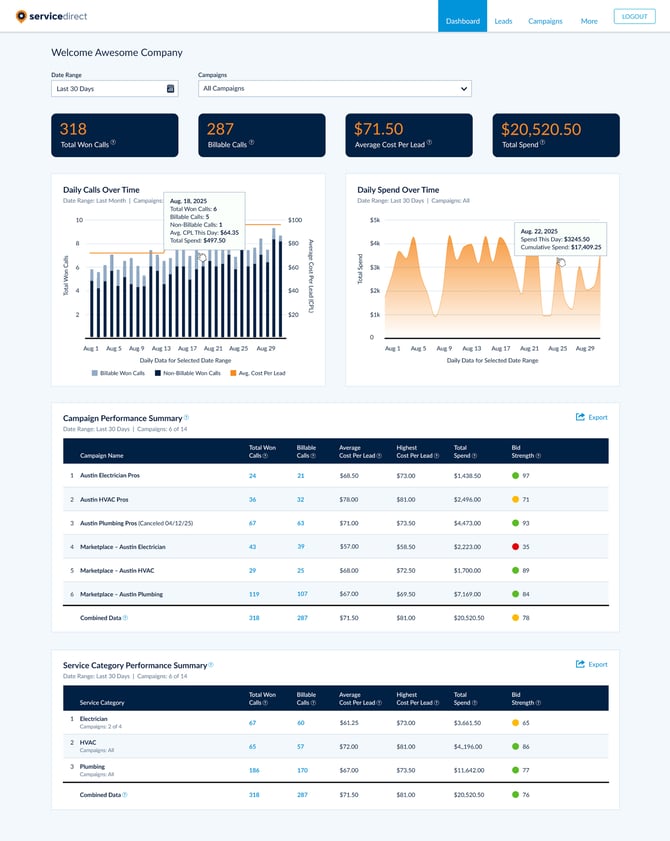
mySD Dashboard Features
- Filtering – Use the Date Range and Campaigns Filters to reload the Dashboard with the just the data you're looking for.
- Key Metric Scorecards – View your Won Calls, Billable Leads, Average Cost Per Lead (CPL), and Total Spend at a glance.
- Compare percentage delta trends versus the equivalent time period prior to your selected Date Range Filter.
- Daily Calls Over Time – Visualize the direct relationship between your Cost Per Lead (CPL) and call volume over time.
- Each Bar displays Billable Won Calls and Non-Billable Won Calls and the orange line shows your Average CPL for each day.
- Daily Spend Over Time – Monitor your budget pacing and investment over time.
- If your spend appears off-track, consider adjusting your daily budget or Campaign bid settings to better align with your goals. For more details, see Managing Your Campaign Budget.
- Campaign Performance and Service Category Performance Summary Tables – See a breakdown of each of the Campaigns and Service Categories matching your current Filters, displayed in two tables.
- Click any blue link in the rows to open those specific Leads in your Lead Manager and see granular call-level details.
- Compare percentage delta trends versus the equivalent time period prior to your selected Date Range Filter.
- Proprietary Bid Strength Metric – See a competitive indicator of how often your bid wins in our marketplace auction to help you optimize spend.
- The higher your Bid Strength (out of 100), the more likely you are to win the calls available in our marketplace that match your Campaign requirements.
- To improve your Bid Strength, consider increasing your bid amount, expanding your Campaign Service Area, or broadening your selected Service Categories.
Note: Bid Strength updates periodically based on current marketplace competition. Check back regularly to monitor changes and adjust your settings as needed.