
Definitions
- Billable Call: Any call that occurs when a New Potential Customer is seeking a service that your Service Category typically provides or any call that results in a Booked Appointment.
- Non-Billable Call: Answered calls that match our examples of Non-Billable Calls below.
Examples of Non-Billable Calls:
- The call duration is less than 20 seconds.
- The caller is Spam, a Robocall, or is clearly identifiable as a Wrong Number.
- The caller is not the Decision Maker, such as a tenant, roommate, or neighbor.
- The caller is seeking employment.
- The caller is soliciting.
- The caller is seeking a Service Category you do not provide (e.g. You are a plumber, but this caller requires an electrician).
- Please note that booking an appointment with the caller, even for a service you do not provide, will automatically make the Call Lead Billable.
- The caller is a previous customer.
- The caller is located outside of your Service Area.
- The caller was referred to you directly from another person.
- The call came in while your Campaign is Paused.
Examples of Billable Call Leads with No Booked Appointment
Our service is designed to connect you with real, New Potential Customers seeking your services. While many Billable Calls will result in Booked Appointments, not every opportunity can be converted. The following are examples of calls that remain Billable even without a Booked Appointment:
- Missed Calls
- All Missed Calls are considered Billable since we cannot investigate them due to the fact that there's no Call Recording to listen to.
- Price Shoppers
- Read more about How to Turn Price Shoppers into Valuable Customers
- Caller seeks a service that your Service Category typically provides.
- There is currently no way to limit advertising to specific services within a category, and services cannot be edited in mySD. If a service is generally offered by a company in a given Service Category, then those services are included in our advertising for the matching Campaigns and would be considered Billable.
- Call Drops / Hangups.
- Caller books service with a competitor after reaching you.
- Cannot agree on pricing.
- Caller cancels their Appointment.
Booked Appointments Make Call Leads Automatically Billable
If a call results in a Booked Appointment — even for a Service Category different from your Campaign — that call is automatically considered Billable.
- Example: You have a Gutter Installation Campaign, but do not have a Gutter Cleaning Campaign. If a caller requests Gutter Cleaning and you do decline the work, then the call will be considered Non-Billable as a service not offered. However, if you do want the job and book the appointment, despite it not being a typical Gutter Installation job, then the call will be considered Billable since an appointment was booked.
 Understanding Billable Calls by Service Category
The pages linked below are organized by Service Category and provide deeper examples of what qualifies as Billable or Non-Billable for each type of work. These lists are designed to help you set clear expectations and improve lead handling. They are not exhaustive and may be updated as industry practices and marketplace insights evolve.
- Appliance Repair
- Electrician
- HVAC
- Locksmith
- Mold Remediation
- Pest Control
- Plumbing
- Roofing
- Towing
- Water Damage
- Wildlife
Submit a Call Lead for Review
We generate thousands of Phone Call Leads across the country and continually improve our automated technologies and expand our human Lead Review Team to catch Non-Billable Calls before you're even aware of them. Even so, we also need your help — please submit Call Leads for Review if you believe they are Non-Billable according to our Service Terms.
We never want to charge you for a call that does not have the potential to turn into new business for you. Our Call Review process ensures that you have the ability to dispute calls you believe should be Non-Billable.
A Call is Eligible for Review if...
- The call is Answered.
- The call was received less than 7 days ago.
- Call Recording was enabled at the time the call was received.
Once submitted, our Quality Assurance Team typically responds within 2–3 business days with a decision. If more information is needed, a team member may reach out to you directly.
While in your mySD Lead Manager, you can click any Call Lead row to expand it to a detailed view. In addition to seeing valuable information specific to that call, here you will also find the option to Submit for Review.

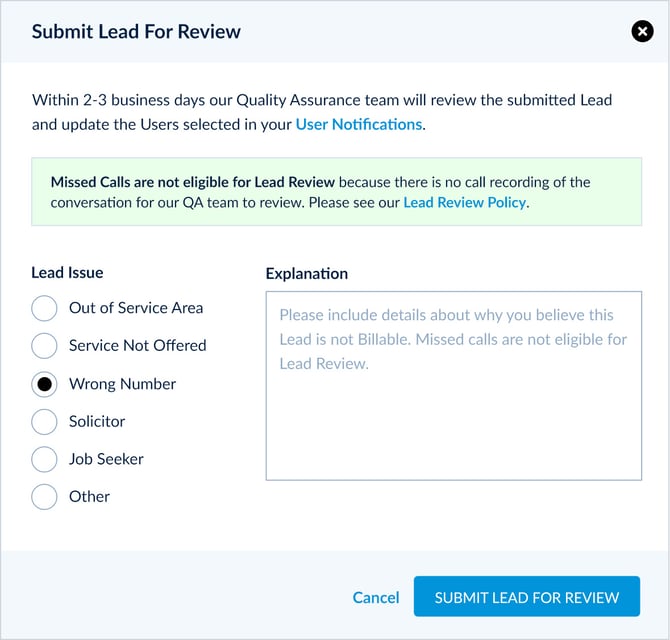
In the popup, please choose a reason you believe this call should not be billed. Note any follow-up attempts, previous calls received by the same customer, or solicitors in the Explanation box. The more details you leave, the more informed we can be when making a Lead Review decision.
Note: Lead Review is not available for Duration-based Campaigns. For Duration-based Campaigns, billability is determined solely by the total time the caller spends on the phone with you — not by the nature of the call.