Does your plumbing company also offer heating and air services? Or perhaps you’re advertising for health insurance and you’d like leads for auto insurance as well. If you are looking to grow your Service Direct Account, you might be interested in adding Campaigns to target additional Service Categories.
Our Service Categories
We offer Lead Generation services to a multitude of different Home Service Categories, including Pest Control, HVAC, Appliance Repair, Mold Removal, and many more. We also offer Lead Generation for Medical, Legal, Automotive, and Professional Service Categories.
View our list of Pay Per Lead Industries to see if we can add a Campaign in your desired Service Category. You can also view the recommended Cost Per Lead pricing by Service Category.
How to Add a New Campaign for a Service Category
To add service categories to your mySD account, follow these steps:
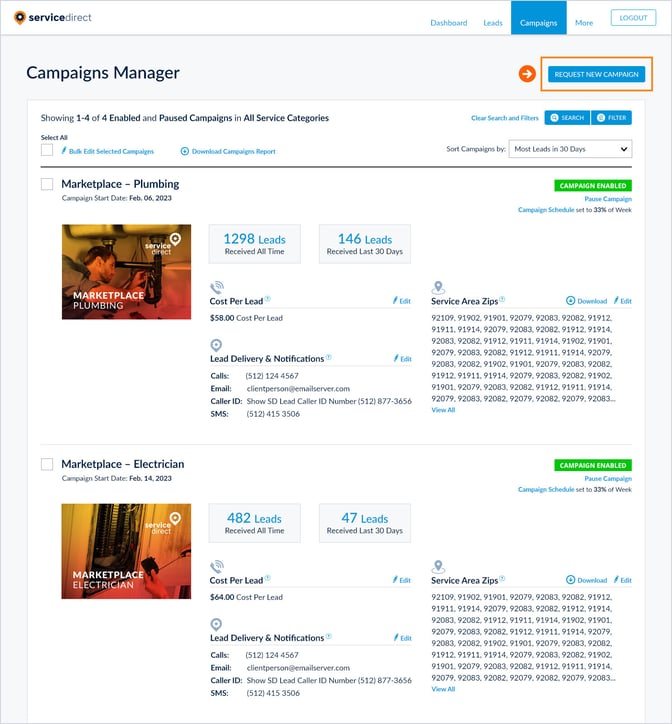
- Log in to your mySD account and navigate to the Campaigns Manager.
- Click the Request New Campaigns button at the top right of the page.
- Complete the form with the required details, including: the service category you want to target, your desired geographic area or zip codes, and your preferred Cost Per Opportunity (the maximum amount you wish to pay per qualified lead).
- Submit the form when all fields are complete.
A member of our Support Team will notify you once your Campaign is live. If we have any questions or need to discuss your options, we will reach out to you directly. Note: if your requested Service Category is not available in your area, our team will contact you to explore alternatives.